App Store Country & ASO Market Research
Explore available country rankings and keyword context before choosing a market to investigate.
On this page
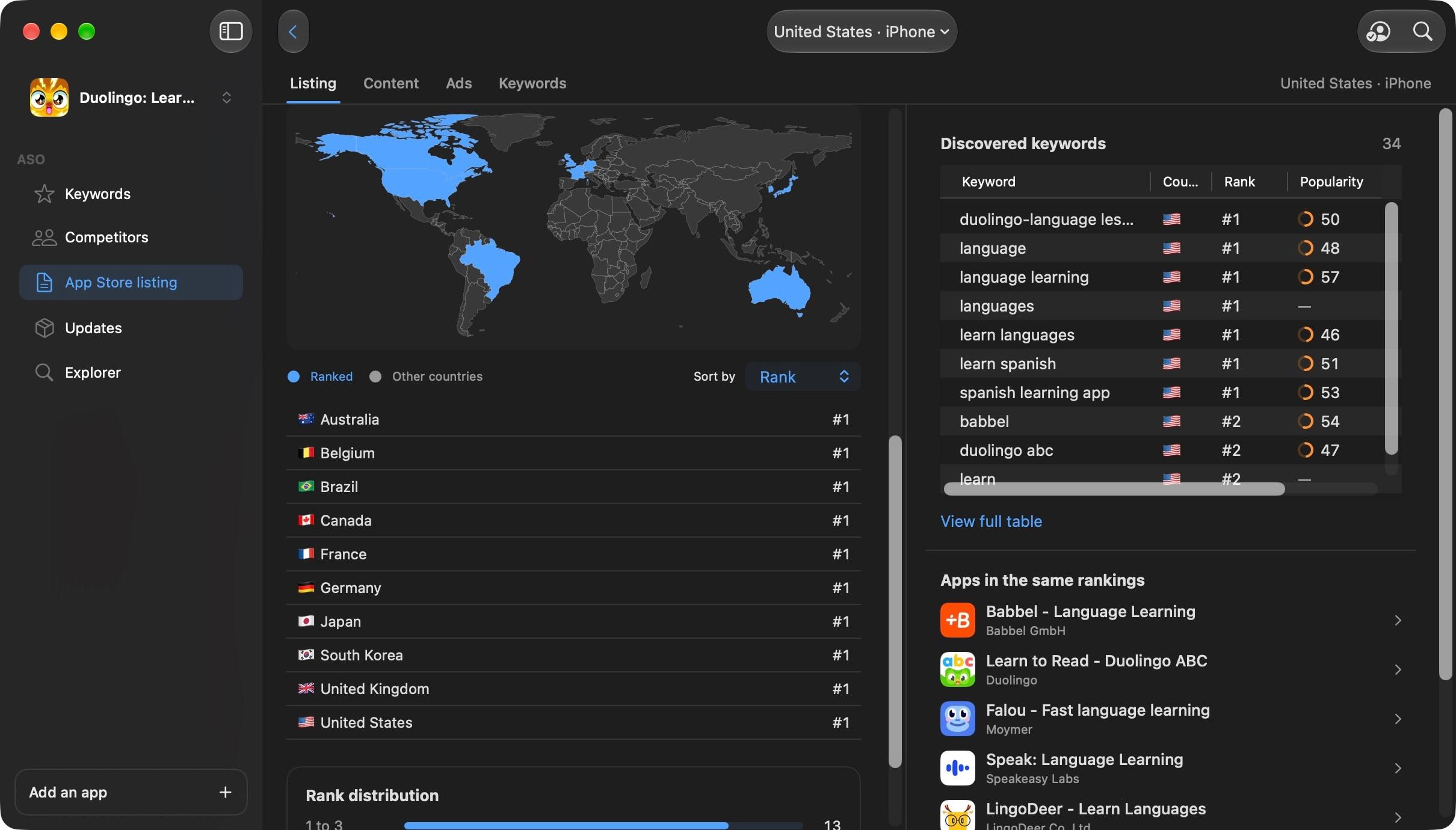
The Duolingo country capture shows a category map beside keyword observations. The visible country list shows #1 in the selected free Education chart across ten markets. Those are category positions, not rankings for a search phrase.
AppHunch keeps the map, country list, and keyword research near each other so you can move from a geographic overview into a local question. The first step is knowing which kind of ranking you are reading.
Read the chart context before the map
Check the selected category, chart type, and device. The map in the capture is a free Productivity chart for iPhone. The list supplies the actual positions underneath the geographic overview; the blue fill indicates countries with a ranking observation.
Do not read the size or colour of a country as the size of its opportunity. A #1 category position in one storefront does not tell you how many users searched there, and a grey country is not a claim that the market has no demand.
Open a country-level keyword question
After selecting a market to investigate, research a term in that storefront. Keep popularity, estimated difficulty, the leading apps, and the observation date distinct. A category chart cannot tell you which phrase local users entered.
Language and storefront also need separate decisions. A localized listing is a language version of your metadata; a keyword observation is tied to a market. Decide which storefront you are investigating before choosing the language draft you want to improve.
Check whether your own app already has attention there
A competitor’s country view can help you choose where to look. Your own connected reports answer whether your app already receives impressions, product page visits, or sales in that market.
Choose the same country in analytics and review the received dates. In sales, also select the currency appropriate to the measure: the selector filters source currencies rather than converting all transactions. Then inspect the local product price if monetization is part of the question.
| View | Question it helps answer |
|---|---|
| Category chart | How the researched app appears in a particular category, chart type, device, and country. |
| Keyword observation | Where an app appears for a particular search phrase in the selected market. |
| Your analytics | The received impressions, product page views, and available acquisition reports for your app. |
| Local pricing | The selected product’s current and scheduled prices in that country. |
Scope the localization work before expanding
Suppose your own reports show visits from a country you have not recently reviewed. Check the relevant language draft and the local price before planning a complete expansion. That gives you a defined task: review a subtitle, investigate a few terms, or inspect an existing scheduled price.
Keep the decision attached to the country and the report window that prompted it. When you review it later, you can return to that same question rather than compare a new global total with an unrelated local observation.
From a country overview to a practical next step
Open the available country picture
Review the map and list, noting the source and coverage of the observations.
Investigate one market
Check local keyword context and inspect relevant public app profiles.
Compare your own signals
Look at connected analytics, sales, and prices for the same country.
Define a small piece of work
Choose a research, localization, or pricing task that you can review afterwards.
Questions & answers
Does public market research require App Store Connect?
No. Public research works without a connection. Accessing your own app’s analytics, sales, and prices requires the relevant App Store Connect access.
Are category rankings the same as keyword rankings?
No. Category positions describe a category chart. Keyword observations describe a particular search and market. They provide different context.
Does a blue country on the map mean it is a better market?
No. The legend distinguishes countries with a ranking observation from other countries. Read the listed position and chart context, then investigate keyword demand and your own app’s reports separately.